Ollama and llama.cpp overlap, but they are not interchangeable labels for “run a model locally.” Ollama emphasizes a managed local model experience and documented API. llama.cpp exposes a lower-level inference toolkit, multiple binaries, extensive build choices, and an OpenAI-compatible server path. The better option depends on who operates it, which interface the application expects, and how the same model behaves on the actual machine. A fair comparison freezes the workload before it measures either tool.
The operating decision
Name the user and the service boundary. A single developer experimenting on a laptop, a desktop application calling localhost, and a shared team endpoint have different needs. Record required operating systems, authentication boundary, acceptable setup burden, model storage, update ownership, concurrency, and whether the API must match an existing client.
Define the stop conditions before installation: unsupported hardware, memory pressure that disrupts the host, missing API behavior, unacceptable first-token delay, unstable recovery after cancellation, or licensing uncertainty around the selected weights. This prevents a fast demo from becoming an adoption decision by momentum.
One model and one prompt set
Use the same model family, parameter count, quantization, context length, and prompt text when the two tools can load an equivalent artifact. Record the exact model identifier and checksum. If packaging prevents exact equivalence, document the difference and do not present the numbers as a direct engine comparison.
Prepare three prompts: a short deterministic extraction with a known answer, a medium generation task representative of the application, and a long-context prompt near the intended working size. Fix temperature and other sampling controls where the interfaces expose them. Run one warm-up that is excluded from the measurement, then at least five recorded trials per case.
What does the user actually experience?
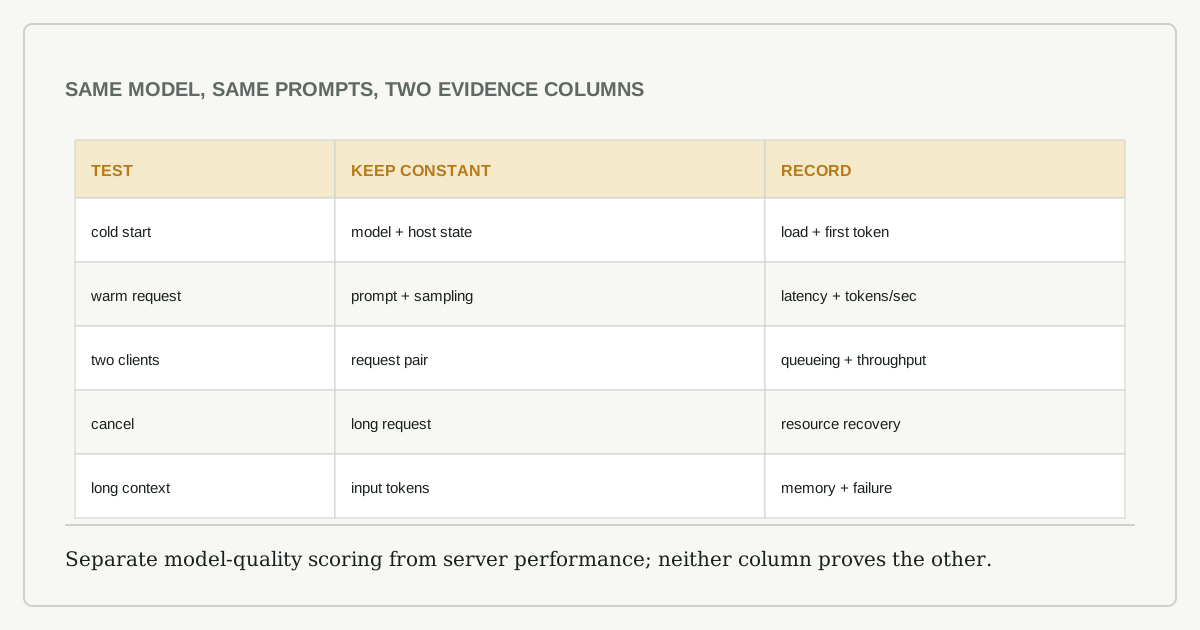
Collect time to first token, total generation time, generated token count, process memory, accelerator memory where available, CPU utilization, model-load time, and error behavior. Use the tools’ documented response or benchmark fields where possible rather than estimating from a stopwatch.
| Test | Keep constant | Record | Why it matters |
|---|---|---|---|
| cold start | model, host state | load plus first token | interactive restart cost |
| warm request | prompt and sampling | first token, tokens/second | ordinary responsiveness |
| long context | input tokens | memory, latency, failure | actual context ceiling |
| two clients | request pair | queueing, throughput | shared-service behavior |
| cancellation | same long request | resource release | operational recovery |
Do not mix benchmark output from one binary with end-to-end API timings from the other. Keep an engine-level table and an application-path table if both matter.
Two operational surfaces
For Ollama, inspect how models are created or pulled, how the local API is reached, where data and model files live, and what your client depends on. For llama.cpp, record the build flags, backend, server command, model path, chat template, and API options. The additional control can be valuable, but every undocumented flag becomes part of your maintenance burden.
Test upgrades in a copy or on a pinned machine. Confirm whether the client behaves the same after a version change and whether stored model identifiers still resolve. Review network binding: a server intended for localhost should not become reachable from the wider network by accident. Neither project’s convenience layer replaces authentication and transport controls for a shared or exposed deployment.
Answer quality is a separate score
Performance cannot tell whether the application is correct. Score the deterministic extraction against the known answer, then use a written rubric for the representative task: required facts, forbidden claims, format, citations where applicable, and refusal behavior. Keep model quality conclusions tied to the model and prompt configuration; do not attribute them to the serving tool without evidence.
Repeat one malformed request, one request beyond the configured context, and one cancelled stream. Record status codes, error text, process health, and whether memory returns to its baseline. A tool that is slightly faster but requires manual recovery may be the worse server for an unattended feature.
Model custody and disk behavior
Record where each tool stores manifests, model blobs, configuration, and logs; who can read them; and how a model is removed. Confirm available disk before pulling a second quantization and observe whether interrupted downloads leave recoverable or orphaned files. For a shared workstation, decide whether one user can enumerate or invoke another user’s models. These operational details rarely appear in speed charts, but they determine whether the chosen server can be supported without surprise storage growth or accidental data exposure.
A portable result
Publish the host specification, versions, exact commands with secrets removed, model identifier, checksums, prompt files, raw timing output, and scoring rubric. State differences that prevented perfect equivalence. End with a conditional verdict such as “choose Ollama for this single-user API prototype” or “choose llama.cpp for this pinned build requiring backend control,” not a universal winner.
The comparison earns trust when another person can rerun it on the same machine and explain why the result may change elsewhere. Local inference is unusually sensitive to hardware, build flags, quantization, context, and concurrency; those details are the finding, not clutter around it.