A ComfyUI graph can look self-contained while depending on a model file, custom node, Python package, filename convention, or local path that exists only on its author’s machine. Installing more nodes may make an error disappear without explaining which dependency fixed it. A portability test reverses that order: build a minimal core graph, save its evidence, reopen it in a clean profile, and add one dependency only when a recorded failure requires it. The outcome is a workflow package another person can inspect and reproduce.
Before portability, establish a baseline
Use an official installation path appropriate to the operating system and record the ComfyUI version or commit, Python environment where relevant, hardware, driver/runtime information, and launch command. Keep the first profile free of community custom nodes. Confirm that the interface loads and that a simple core-node workflow can queue successfully before importing someone else’s graph.
Choose a small model you are licensed and equipped to run. Record the exact filename, source, checksum, model family, and destination directory. “SDXL model” is not enough to reproduce a run. Do not redistribute weights inside a workflow bundle unless their license permits it; the manifest should point to the authoritative source.
Five artifacts make the baseline portable
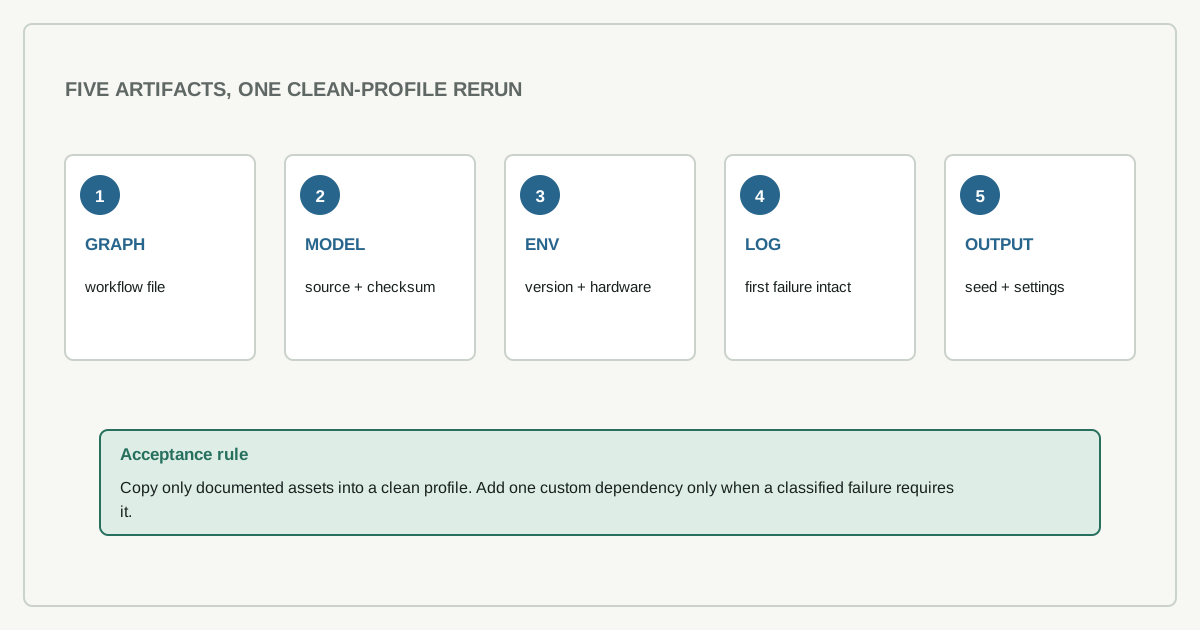
Save the workflow in the format supported by the current application, one generated output with embedded workflow metadata when available, a screenshot of the graph, the console log, and a short environment manifest. Name the files with a test identifier and date.
| Artifact | What it establishes | Failure it exposes |
|---|---|---|
| workflow file | graph structure and parameters | missing or renamed nodes |
| model manifest | exact external assets | silent model substitution |
| environment note | runtime and hardware | machine-only success |
| console log | execution path and errors | hidden import or runtime failure |
| output plus settings | observed result | “it ran” without traceability |
The image is not proof by itself. The surrounding artifacts connect the visible result to the graph and environment that produced it.
The clean-profile test
Close the original session and launch a separate clean environment or portable installation. Copy only the documented workflow and required model. Do not copy the entire custom-node directory or user profile. Import the graph and classify each failure before changing anything: missing core version, missing model, missing custom node, missing Python dependency, invalid path, unsupported hardware operation, or changed input.
Fix one class at a time and rerun. When the graph needs a custom node, record the canonical repository, pinned commit, license, installation command, added Python packages, restart requirement, and node types it contributes. Read the code path that handles files and network requests. A manager’s install button improves convenience; it does not remove the need to understand what code enters the Python process.
Where does portability actually stop?
Run the same fixed seed and inputs twice and record whether outputs match in that environment. This does not establish determinism across hardware or software versions. Define whether acceptance requires identical bytes, matching structure, or a documented visual criterion. Then change one intended parameter and confirm the output responds in the expected direction. Try an absent model or disconnected node and preserve the error. These checks show whether the manifest actually describes the graph and whether failure is visible.
For large workflows, collapse the test to the smallest graph that still demonstrates each custom dependency. A 100-node canvas is difficult to review because layout and reroutes hide the execution boundary. Keep a readable “acceptance graph” beside the creative production graph.
Updates belong in a copy
Follow the official update path for the installation type. Clone or copy the known-good profile, update the copy, and rerun the acceptance graph before moving production work. Record changed ComfyUI and custom-node revisions and the Python dependency set. Official update procedures can require coordinated core and dependency updates; preserve those as one documented change rather than updating only the core. If a workflow fails, the paired environments let you distinguish an upstream change from a damaged asset or unrelated machine issue.
Do not solve an update failure by recursively upgrading every package. That destroys the comparison. Preserve the first error, identify its owner, and change the smallest dependency that explains it.
Input provenance belongs beside the graph
Workflows can also depend on source images, masks, embeddings, prompts, and preprocessing choices that the canvas does not preserve clearly. Record the origin and license of reusable inputs, remove private metadata before sharing, and use checksums for files whose exact bytes affect the result. When an input cannot be distributed, provide dimensions, color-space or format requirements, and a synthetic test substitute. This separates a graph portability failure from an unavailable or silently modified input.
Package the handoff for a second machine
The final folder should contain the workflow, screenshot, output, checksums or authoritative model links, pinned custom-node list, environment note, known limitations, and the clean-profile test result. State which files are excluded for licensing or size reasons. Add a refresh trigger for application updates, custom-node updates, model replacements, and hardware changes.
Portability is not achieved when a graph opens on the original machine. It is achieved when a clean environment fails in understandable ways, the documented dependencies repair those failures, and a second person can reproduce the accepted output without inheriting an unexplained profile.
Evidence status
This article is a proposed portability procedure. Practical AI Radar has not published a clean-environment ComfyUI execution bundle for it. The artifact table describes what to collect; it is not a report that these tests passed.